電子商務/廣告

Amazon Module

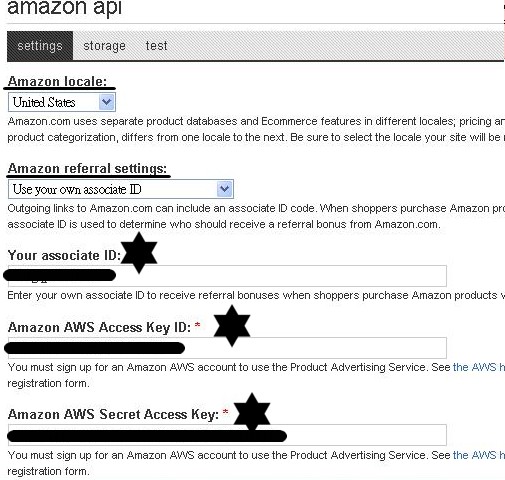
amazon module:2010年01月30日星期六 適用於:Drupal初學者,想更改Drupal theme外觀 的人,對CSS有興趣的人,對PHP有興趣的人,以前用Dreamweaver的人,以前用其他Blog CMS的人。本文用Drupal6.14,想在Drupal中使用Flash,詳見本文的環境。 想要在自己架的Drupal網站抓amazon美國網站的資料?用amazon module,詳如下。(若想先看看效果,到這裡) Using Drupal first edition (Oreilly出的)第四章、Product Reviews,其中的amazon module值得介紹,amazon module最大的功能是提供其資料庫供外界使用,但是要如何設定呢? (一) 如同一般安裝模組,依照 Using Drupal first edition (Oreilly出的)第四章一步步做,需注意的是下載的例子 (using_drupal_source-2009-01-16.zip)並無法成功做到書中157頁所述----讀取amazon.com網站資料庫,錯誤訊息是:No Amazon product with the ID(詳見後記),原因是下載的例子amazon module6.x-1.0-beta5。必需用amazon module 6.x-1.0-rc3才行。用了對的版本後,在admin/site configuration/amazon API時才會出現對的畫面,如下圖Amazon API。共有下列項目需填入:
  1. Amazon locale:如下圖橫線。選用United States。以後選產品,要選amazon美國網站(http://www.amazon.com/)上的產品。不可以用其他地區的,例如:http://www.amazon.cn/。
  2. Amazon referral settings:如下圖橫線。選用Use your own associate ID,選了後,會出現下面"Your associate ID"。
  3. Your associate ID:如下圖星號。到http://www.amazon.com/的join associates去申請。
  4. Amazon AWS Access Key ID及Secret Access Key:如下圖星號。申請完以上的Your associate ID,login後,申請AWS Account。
填好後,依Using Drupal first edition 第四章做Product Reviews content type,再用create content及view,有意想不到的效果,往這裡去看看(二)Click試作網站http://usingdrupalchapter4.百加一講壇.tw/,右的Product finder,出現如下圖畫面,Title下的這些品名是直接自動從amazon美國網站上載入,並且會自動更新(例如:價格),想試試自己加入商品,往這裡(三)將amazon美國網站上的貨品放入自己的網站的方法:到試作網站http://usingdrupalchapter4.百加一講壇.tw/,Click右邊的create content,在圖A畫面中Amazon Product ID處鍵入ASIN,如何找ASIN,到amazon美國網站上,找一貨品,例如:Using Drupal這一本書,看其http://.....中有一串十位數,那就是ASIN,如下方圖B中上方http://....中的0596515804,打進圖A的Amazon Product ID即可。做完,Click右方的Product finder, 就會列出Amazon網站上Using Drupal這一本書及其它一些我已打進去的貨品,接著click Title下的品名、Click ....,最後會連到Using Drupal這一本書在amazon美國網站上的頁面。需注意,不可以用其他地區的商品的ASIN,例如:http://www.amazon.cn/,會找不到,出現:No Amazon product with the ID訊息。 圖A: 圖B:   後記(用amazon 6.x-1.0-beta5失敗):試作Using Drupal chapter 4, 出現Amazon module的問題,如下: * warning: Invalid argument supplied for foreach() in C:\xampp\htdocs\udchapter4\sites\all\modules\contrib\amazon\amazon.module on line 270. * Amazon Product ID : No Amazon product with the ID B001JAH7OM could be located. * warning: Invalid argument supplied for foreach() in C:\xampp\htdocs\udchapter4\sites\all\modules\contrib\amazon\amazon.module on line 270. 曾在drupal.org上找到類似(不全然相同)的po文( http://drupal.org/node/277325 ),試著如comment #1( http://drupal.org/node/277325#comment-905544 )更改,無效。主要是他改的是amazon.module line240,而我的問題在amazon.module line 270。 本文的環境是:
  1. Drupal 6.14。
  2. apache server設在Windows XP上,以http://localhost/drupal為例。
  3. 所有的檔案在c:/xampp/內,以下的路徑均相對於c:/xampp/。
  4. 各檔案均用vim editor打開,行數以vim內的行數為準。
  5. 主機是遠振資訊cPanel環境。
 

Embed widgets

讓 Drupal 網站裡的頁面、區塊和 views,可以被箝入到外部網站。提供以下方式: iFrame:可以使用 JS /<script> 標籤的網站 Google Gadgets:支援 iGoogle 和 OpenSocial。 Facebook FBML:可放進 Facebook applications(不支援使用者頁面) 需要 Tabs 和 Color Scheme API 模組。

Affiliates

這是一個原本用在 SpreadFireFox.com 的網站推薦模組,透過連結、橫幅廣告和按鈕圖片,來推廣網站。每一次透過外站連結而來的點選,都會被紀錄下來,並提供一個排行榜來表揚優秀的推廣者。 如果有使用 Userpoints 模組 2.0 版,會員還可以因為推薦連結而獲得點數。 範例:
  • Spread Thunderbird 採用本模組的 6.x 版本。
  • Spread FireFox 使用此模組的早期版本。

Corner

在網站的左上角或右上角,加上一個裝飾的圖片,並可選擇連結到任何網頁。

Ubercart

最亮的明星商務套件,可發佈商品 、套裝商品、檔案類形式的商品,在各類商品裡提供可選擇的附件商品選項,擴展模組有 紅利點數、折扣、購物車版型、EDI電子資料交換、製造商資料、分期付款、折扣贊助、優惠券....,付款模組有支票、信用卡、C.O.D(貨到付款)、請購單、紅利點數、其他付款方式,可設定分站資料. 中文翻譯檔未全部完成.

Terms of Use

讓使用者在註冊時,必須先同意使用條款。 與 Legal 模組相比,此模組把使用條款保存在一個內容節點裡,好處是:
  • 不另建資料表
  • 可選用輸入格式
  • 可使用修訂版本
  • 可以加入到選單裡
圖示:

Openads

將開源碼廣告系統 OpenX 整合到 Drupal,可依據角色顯示廣告、顯示在區塊或版型裡。

Banner Rotor Module

在區塊裡顯示可輪替的圖片,可作為內容或商品的廣告推薦。

ORDER - UNOFFICIAL 購物車、訂購單

README.txt ========== An alternative e-commerce system. Orders are saved as nodes so that they can more easiliy be integrated into Views and use other Drupal features & modules such as comments, nodeapi, Workflow, Actions, etc.. Order is a self-contained module that provides cart and order functionality. An API is provided for other modules to adjust prices and item contents via order_cart_alter() hooks. After rules are processed, and the cart's owner is ready to check out, the cart is saved as a node. Payment processing is separate from this module, and will operate independently (so one could write a donation system that doesn't need full-blown cart functionality, or find other reasons to pay for nodes outside of the order system). There's more to come, and this is pretty rudimentary. Input is welcome, but don't try running this on a production system yet! 延伸: 本模組的原開發者一年多來都沒有進展,我等不及就直接從 CVS 抓回來把它完成以及改良。 The original code at http://cvs.drupal.org/viewvc.py/drupal/contributions/modules/order/. 參閱 drupal.org 中 cvs 的條款 http://cvs.drupal.org/viewvc.py/drupal/contributions/TERMS.txt?view=mark... "All content submitted to the repository is automatically assumed to be licensed under the GNU/GPL. Any content that is not licensed under the GNU/GPL should not be added to the repository and when found it will be removed by the owner." 因為在 cvs 中取得原始碼,本模組也同樣以 GNU/GPL. 釋出。 主要功能: * 可對任何 content type 視為 order 的對象,予以標示或不標示價格。 * 配套搭售商品 related item 功能,有點神奇。(這個原作的進度 100%) * 商品購物車功能。 * 訂購記錄查詢 -- 位置在「使用者帳號」和 admin/order 。 * 權限控制 -- administer orders, place order, use cart. 假如開放給非會員下單,check out 之前會要求填聯絡表單,但這個部分目前在表單送出前不檢查各欄位。另外也可以要求在 check out 時臨時加入會員或直接登入,以完成 order。 * 用戶 check out 之後,系統會發一封通知給 admin/order/settings 中的 e-mail。 * check out 之後,只是下訂購單記錄,並非完成付款。check out 之後會有付款訊息說明,可透過 admin/order/settings 中,指定付款說明頁面。 * Payment information 會顯示訂單編號、未付款、付款說明頁連結、取消訂單連結。其中取消訂單連結,如果由order管理員標示為 shipping 則不會給用戶取消,想也知道寄出的貨品還被取消訂單的話,就白忙了。 在這裡我留了伏筆,將來可以擴充功能的連結,如按下「付款」按鈕就接到金流的部分。( order.module line 753. ) Todo: * 原作者有留 views 和 一些 hooks, api,address,現在我不是很懂,沒有更改它們,只是把這個模組先做到可以用的程度,我想這個部分還可以再繼續發展一些五花八門的外掛功能,畢竟購物車的花招很多,但目前只訴求簡單,最低的應用限度。 * 保留一些用不到的程式碼當作參考,目前尚未清除。 * ... 實際應用: * 本模組適合應用於簡單、基本的訂購網站或產品詢價網站。 * 搭配 content type + user profile 使用。 * 用 views 來呈現自訂的商品內容列表,再加客製化的 node tpl,會很有看頭。 Developers for Order ====================== mfredrickson Allie Micka UNOFFICIAL AUTHOR/MAINTAINER =============================== LIN, Chen-sheng / Hipfox harry at ap247 DOT net web site: http://demo.ap247.net

Advertisement

Advertisement 模組 (用字典查這個英文意思是廣告、宣傳的意思 - 名詞) 簡稱 Ad 模組 在繁體站上找到的 Banner 模組沒有 5.x 版的 但是竟然自已也沒想到英文的 drupal 網站上已經有另一套廣告模組了!! 所以找不到廣告模組的可以用看看這個模組
RSS feed