
嗨!最近研究的是form的美化, 延續上篇[問題],
解決之後真開心, 分享一下我的美化的code(用CSS)
然後還是有幾個問題:
(1)想弄更漂亮, 想在input加上onFocus之類的, 不知怎麼加
(2)像我這樣把CSS放在tpl.php, 會不會不好呢?
謝謝!
先看效果, 表單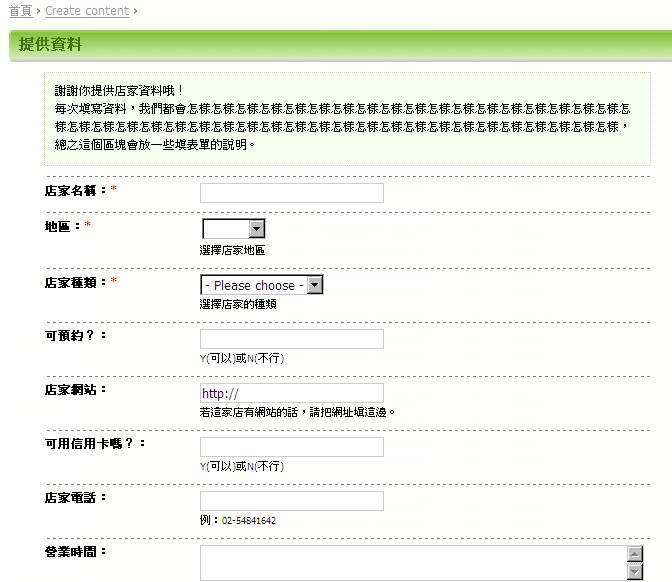
這是按鈕
下面是我的原始碼:
template.php
<?php

function phptemplate_lifestyle_node_form($form) {

  global $user;

  $vars = array('user' => $user, 'form' => $form);

  return _phptemplate_callback('lifestyle_form', $vars);

}

?>
lifestyle_form.tpl.php
<?php

//drupal_set_message('
' . print_r($form, true) . '
');
drupal_set_title('新增寵物店家資料');
?>
每次填寫資料,我們都會怎樣怎樣怎樣怎樣怎樣怎樣怎樣怎樣怎樣怎樣怎樣怎樣怎樣怎樣怎樣怎樣怎樣怎樣怎樣怎樣怎樣怎樣怎樣怎樣怎樣怎樣怎樣怎樣怎樣怎樣怎樣怎樣怎樣怎樣怎樣怎樣怎樣怎樣怎樣怎樣怎樣怎樣,總之這個區塊會放一些填表單的說明。
<?php //把種類拉到最上面 ?>
<?php print drupal_render($form['taxonomy']['4']); //type ?>
<?php print drupal_render($form['taxonomy']['3']); //location ?>
<?php //不要這些 ?>
<?php drupal_render($form['taxonomy']); //分類的外框,很醜 ?>
<?php drupal_render($form['body_filter']['format']); //內文說明,不要?>
<?php //剩下的表單依照權重排列 ?>
<?php print drupal_render($form); ?>
Re: Form的美化心得
CSS 建議另外存到一個檔案中,這樣有兩個好處:
如果每個表單的美化都是一樣的話,直接放到 style.css 裡面就可以了~
Re: Form的美化心得
(1)想弄更漂亮, 想在input加上onFocus之類的, 不知怎麼加
在 render 表單元素之前
修改表單元素的屬性
<?php $form['taxonomy']['4']['#attributes']['onFocus'] = "alert('focus')"; //增加表單元素的#attributes ?>

<?php print drupal_render($form['taxonomy']['4']); //type ?>
(2)像我這樣把CSS放在tpl.php, 會不會不好呢?
把少量的 css 放在tpl.php 是 ok 的
之後要修改也蠻方便的 都在同一個檔案裡
不過 css 應該只針對這個 tpl.php 輸出的部份做設定
必須要注意防止干擾到同一個畫面內其他區域的元素
所以 css 的部份應該要使用獨特的開頭來選擇元素
例如 #content-area .form-submit 以版型的 layout 作為開頭
如果 #content-area 裡面同時出現兩個以上的表單
會造成其他的表單內的 .form-submit 也受到影響
使用
< form >的 id 來做為開頭 取代 #content-area 應該會比較好不過 如果 css 的量比較多的話
可以考慮放到獨立的 css 檔案
然後在 lifestyle_form.tpl.php 內
使用 drupal_add_css() 設定載入 css 檔案
ex => drupal_add_css(druapl_get_path('theme', [theme name]).'/lifestyle_form.css');
這樣網頁會在
的部份就載入 css 檔案就瀏覽器解讀 css 來說應該是比較快的
這部份就看個人如何取捨了
Re: Form的美化心得
嗯!原來有可以快取的好處!
我目前分了,我是計畫在每個tpl最上面,都放這些
<?php

//drupal_set_message('
');
drupal_set_title('新增寵物店家資料');
drupal_add_css(path_to_subtheme() .'/lifestyle_form.css');
?>
這邊的path_to_subtheme()是zen這個模版的方式。我是在zen下面製作subtheme。
用drupal_add_css可以讓讀這個tpl的時候讀這個css,正就是我要的啊!
另外form的id是node-form,這應該是「所有文章發表」表單都是這個,
的確比#content-area合理。
Re:
嗨!又有個問題了,
我想在
裡面新增class,我用了以下原始碼:$form['#attributes']['class'] = 'niceform';以及這個
$form['#attributes'] = array('class' => 'niceform');都沒辦法耶!
目前的form在render後是這樣
希望變這樣
後來我跑到template.php,改成這樣
function phptemplate_buytogether_node_form($form) {

  global $user;

  $form['#attributes']['class'] = 'niceform';

  $vars = array('user' => $user, 'form' => $form);
return _phptemplate_callback('buytogether_form', $vars);
}
然後print_r就會出現
[#attributes] => Array(
[enctype] => multipart/form-data
[class] => niceform
)
真棒!可是可是!看原始碼,仍舊沒加上去!
到底是怎麼回事?
Re: Form的美化心得
大概是因為 form 標籤本身並不在樣版裡面輸出
所以必須在套用樣版之前就修改 form 的屬性才行
也就是要寫 form_alter 了
Re: Form的美化心得
感謝!我也一直覺得form是在讀取tpl之前就輸出了...
原來form_alter是關鍵!!
我怎麼搜尋"drupal form class"或"drupal form attributes"等等都找不到!
太感謝了!
Re: Form的美化心得
function phptemplate_form($element) {// Anonymous div to satisfy XHTML compliance.
$element['#attributes']['class'] = 'aaaaaaaaaaaaaaaaaaaaaaaaaaaaaaaaaaaaaaaaaaaaaaaa';
$action = $element['#action'] ? 'action="'. check_url($element['#action']) .'" ' : '';
return '\n
\n";
}